Engagement Profiles
Web Engagement Profiles are created based on a recipient's behavior on your website, tracking and storing their interests and actions to build a detailed profile. This profile can then be used for segmentation, personalization, and targeted marketing. Only known visitors are tracked, ensuring accurate insights. Engagement profiles typically capture data on recency, frequency, intensity, recent intensity, and momentum to provide a comprehensive view of user engagement.
The purpose of a marketing engagement profile is to provide marketers with a deeper understanding of their target market. By creating these profiles, marketers can gain insights into consumers' preferences, needs, motivations, and buying behaviors. This information enables marketers to tailor their marketing strategies, messages, and offers to align with the specific interests and desires of their audience.
Following are only a few of the many possibilities:
- Run a re-engagement campaign
- Target an audience based on their recent visit
- Make comparisons between behavioral metrics of customers vs prospects
- Exclude recent visitors from a campaign
- Personalize marketing campaigns with behavioral data
How it works
While visitors are navigating the website, signals are sent continuously to the Event Stream, tracking a visitor's behavior.
Cheetah Digital
On a regular basis, this Event Stream data is imported into Cheetah Digital using the Event Stream import tool, allowing for fast and timely one-way updates. This import is set up only once and can be stopped and restarted at any time.
These Event Stream updates are stored in a dedicated Web Engagement table in Cheetah Digital, linked to a primary Recipient Table. This table collects and stores popular activities that can be used by marketers for improved targeting campaigns as well as personalization.
Engagement Profiles are listed under Data > Tables and are linked to the Sending Table of your choice;
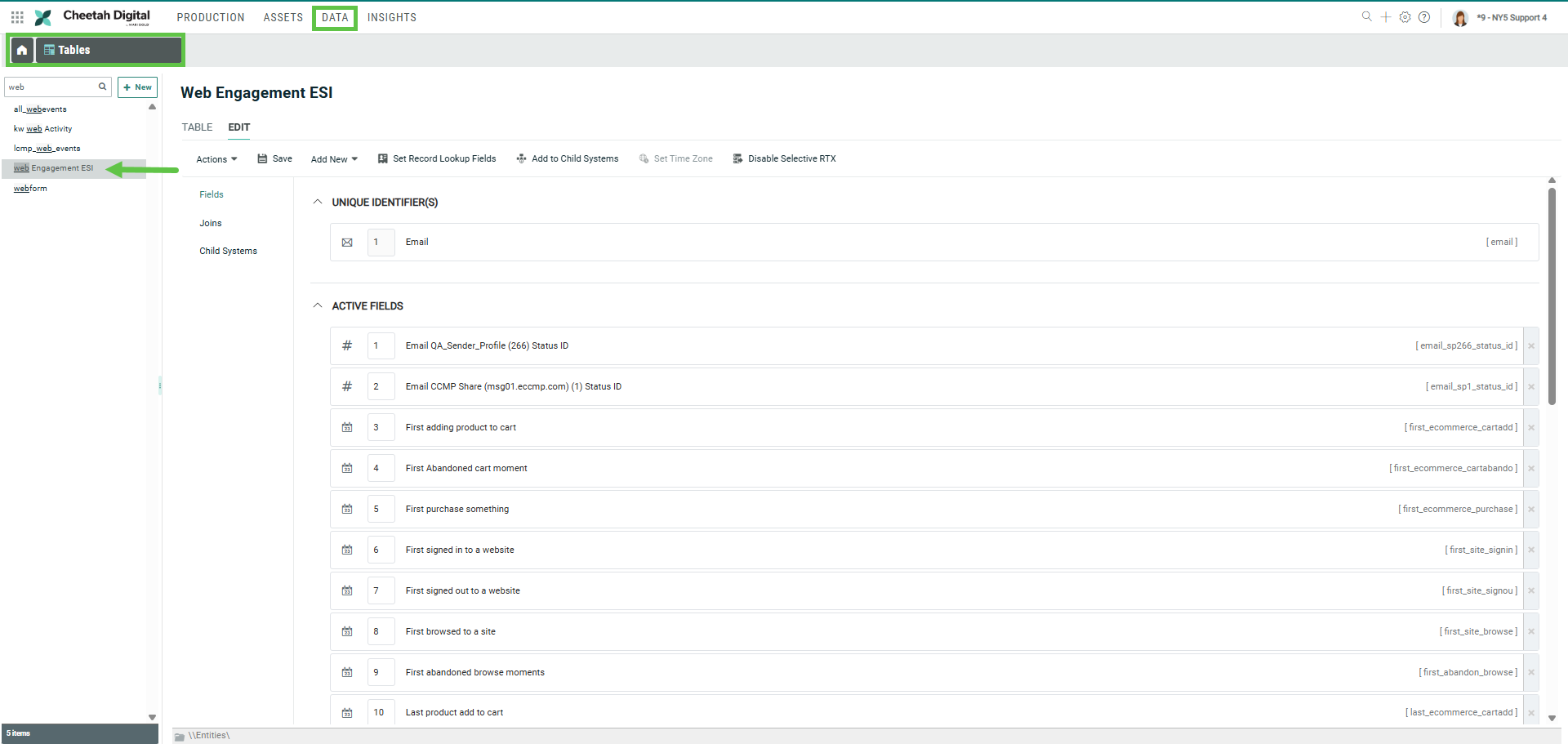
The data in this Engagement Profile table can be used in Cheetah Digital to filter out contacts based on their web behavior, and in triggers.
Table Structure
The following list of fields are stored in the Engagement Profile.
| Table name | ||
|---|---|---|
| Field Name | Description | Type |
| First adding product to cart | first_ecommerce_cartadd | Date Time |
| First remove product to cart | first_ecommerce_cartremove | Date Time |
| First reset cart | first_ecommerce_cartset | Date Time |
| First Abandoned cart moment | first_ecommerce_cartabandon | Date Time |
| First purchase something | first_ecommerce_purchase | Date Time |
| First empty product | first_ecommerce_cartempt | Date Time |
| First signed in to a website | first_site_signin | Date Time |
| First signed out to a website | first_site_signout | Date Time |
| First started a survey | first_survey_start | Date Time |
| First completed a survey | first_survey_complete | Date Time |
| First started a game | first_game_start | Date Time |
| First ended a game | first_game_end | Date Time |
| First started a booking | first_booking_start | Date Time |
| First completed a booking | first_booking_complete | Date Time |
| First started a subscription | first_subscription_start | Date Time |
| First stopped a subscription | first_subscription_complete | Date Time |
| First browsed to a site | first_site_browse | Date Time |
| First abandoned browse moments | first_abandon_browse | Date Time |
| Last product add to cart | last_ecommerce_cartadd | Date Time |
| Last product remove from cart | last_ecommerce_cartremove | Date Time |
| Last cart reset | last_ecommerce_cartset | Date Time |
| Last cart abandoned moment | last_ecommerce_cartabandon | Date Time |
| Last cart abandoned moment | last_ecommerce_cartabandon | Date Time |
| Last cart empty | last_ecommerce_cartempt | Date Time |
| Last website signin | signin last_site_signin | Date Time |
| Last website signout | last_site_signout | Date Time |
| Last survey started | last_survey_start | Date Time |
| Last survey completed | last_survey_complete | Date Time |
| Last game started | last_game_start | Date Time |
| Last game ended | last_game_end | Date Time |
| Last booking started | last_booking_start | Date Time |
| Last booking completed | last_booking_complete | Date Time |
| Last subscription started | last_subscription_start | Date Time |
| Last subscription completed | last_subscription_complete | Date Time |
| Last browsed to website | last_site_browse | Date Time |
| Last abandon browse moment | last_abandon_browse | Date Time |
| # added products to cart | ecommerce_cartadd_count | Number |
| # removed product from a cart | ecommerce_cartremove_count | Number |
| # cart reset | ecommerce_cartset_count | Number |
| # cart abandoned moments | ecommerce_cartabandon_count | Number |
| # empty cart | ecommerce_cartempt_count | Number |
| # purchase count | ecommerce_purchase_count | Number |
| # Website signins | site_signin_count | Number |
| # Website signouts | site_signout_count | Number |
| # Surveys started | survey_start_count | Number |
| # Surveys completed | survey_complete_count | Number |
| # Game started | game_start_count | Number |
| # Game ended | game_end_count | Number |
| # Booking started | booking_start_count | Number |
| # Booking stopped | booking_complete_count | Number |
| # Subscription started | subscription_start_count | Number |
| # Subscription completed | subscription_complete_count | Number |
| # Website browse | site_browse_count | Number |
| # Abandon browse moments | abandon_browse_count | Number |